



Stop wondering
what to eat.
No more endless recipe scrolling. noBrainer is the AI meal planner that picks dinner and builds your grocery list for you.
The problem
Dinner shouldn’t require this much thinking.
Every evening
Here we go again.
Those daily decisions can start to feel overwhelming.
-
What should we eat tonight?
-
What will the kids actually eat?
-
What about tomorrow?
At the store
Still using notes?
Making a list, checking it twice, and somehow still forgetting something.
-
What do we need to buy?
-
Did we forget anything at the store?
-
Have we updated the list?
Back home
Not feeling a grocery run?
A fridge and pantry full of ingredients, but nothing comes to mind.
-
Do we have everything for this dish?
noBrainer takes care of the thinking.
Why noBrainer?
The companion you were waiting for.
Not just another meal planning app.
-
Planning meals shouldn’t feel like a chore.
Your week of dinners and the groceries for it, planned in a couple of taps. Accept what you like, swap what you don’t.
Accept Swap Skip
-
Never write a grocery list again.
Every meal you accept drops its ingredients onto one list, sorted by aisle. Shopping takes half the thinking.
Shared with everyone in your household

-
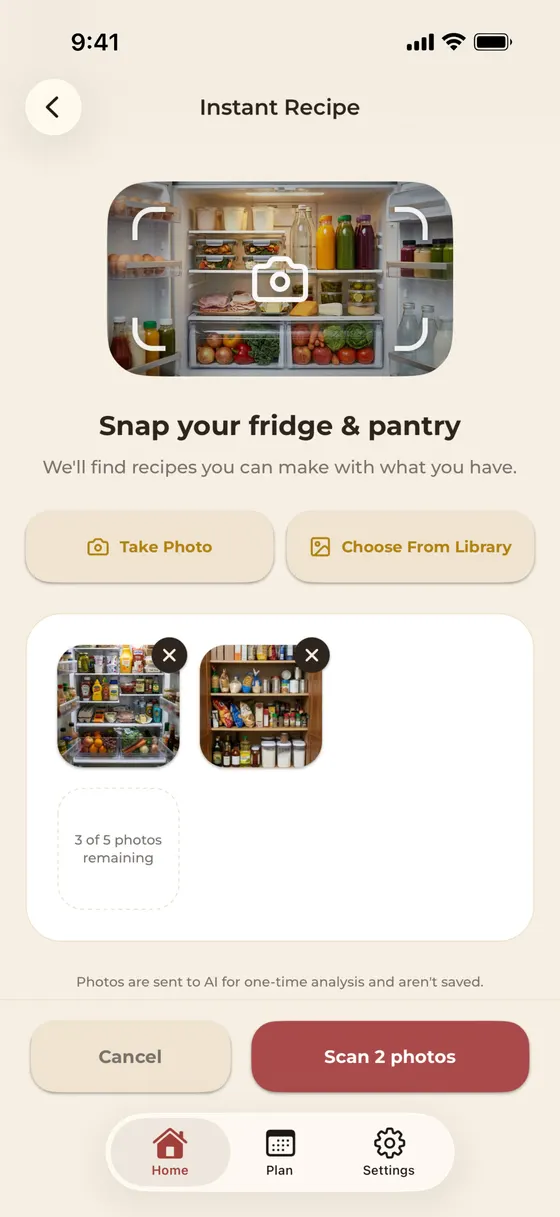
Skip the grocery run. Cook with what you have.
Snap a photo of your fridge and cook from what’s already home. Waste less food and save money along the way.
-
Eat better without trying.
Healthy eating doesn’t have to mean more work. Get balanced meal ideas and see the nutrition, so you know what you’re eating.


-
Meals everyone at the table likes.
It learns from every accept and swap, so suggestions keep getting closer to what your household loves.
Kids, diets and favorite cuisines, remembered

Less thinking. More good food. Less stress.
New · Households
One household. One subscription. Better meal planning.
Bring your household together on noBrainer. Share meal plans and grocery lists, keep everyone in sync, and enjoy the full experience with just one subscription.
Made for your table
It learns what your household actually eats.
Tell noBrainer about your household once. Then it gets better at suggesting meals you’ll actually want to cook.
- Family size
- Ages
- Dietary preferences
- Favorite cuisines
- Cooking time
- Favorite meals

One dinner. Two versions. One grocery list.
Kids want something simple. Adults want something different. noBrainer can surface a family-friendly version alongside the adult recipe without turning your grocery trip into two separate shopping lists.
For the kids
Crispy chicken & butter noodles
mild, familiar, zero negotiation
For the grown-ups
Same chicken, gochujang-glazed
extra heat, pickled cucumbers
One grocery list
- Chicken thighs
- Egg noodles
- Butter
- Cucumbers
shared ingredients, one grocery run
Six languages
Use noBrainer in your language.
Switch anytime in Settings and the whole app changes instantly, meal suggestions included.
- English
- Français
- Español
- Deutsch
- Italiano
- Português
The payoff
More time enjoying dinner.
Less time planning it.
- No spreadsheets.
- No recipe hunting.
- No manually building grocery lists.
- No standing in the supermarket wondering what you forgot.
Just open noBrainer.
7-day free trial · No card to start · Cancel anytime
The things you’re about to ask.
What should I eat for dinner tonight?
noBrainer answers that for you. The app gives one personalized dinner suggestion each day, tuned to your household size, dietary preferences, and the meals you actually liked the last time. One tap and dinner is decided.
Is noBrainer free?
noBrainer offers a 7-day free trial with no card required to start. After the trial it's a monthly or yearly subscription, billed through the App Store or Google Play, and you can cancel anytime in your phone's subscription settings. One subscription covers your whole household.
Can my whole household use noBrainer on one subscription?
Yes. Invite your partner, roommates or family to your household and everyone shares the same meal plan and grocery list from their own phone. Everyone can plan meals and shop. When one person subscribes, the whole household is covered.
How do I invite someone to my household?
In the app, go to Settings, then Household, and tap Invite someone. Share the link or the 6-character code by text or any messenger. They install noBrainer, tap Join my household and type the code.
Which languages is noBrainer available in?
English, French, Spanish, German, Italian and Brazilian Portuguese. Change the language anytime in Settings and the whole app switches instantly, meal suggestions included.
Is noBrainer available on Android?
Yes. noBrainer is available on iPhone from the App Store and on Android from Google Play.
Does noBrainer build my grocery list automatically?
Yes. Every meal you accept adds the needed ingredients to your grocery list automatically, sorted by store section. When you walk into the store, the list is already done — no copying ingredients between apps.
Are the meal suggestions kid-friendly?
Yes. If you tell noBrainer the ages of your kids, it suggests a kid-friendly version of the same meal alongside the grown-up version — softer textures, calmer flavors, the same ingredients — so one shopping trip and one cook covers everyone.
How is noBrainer different from other meal planning apps?
Most meal planning apps give you a long list of recipes to pick from. noBrainer decides for you. It gives one answer per day, learns from every accept/swap/skip, and updates your grocery list in the same loop. It removes the decision rather than helping you make it.
While the oven preheats —
Dinner ideas & meal-planning guides
- Family Meal Planner App: How One noBrainer Subscription Covers the Whole Household Oct 13, 2026
- How to Share a Grocery List With Your Family (and Keep It Updated) Oct 13, 2026
- Meal Planning for Couples and Roommates: Who Decides, Who Shops Oct 13, 2026
- Weekly Dinner Rotation: You Don't Need 100 Dinners, You Need 12 Aug 17, 2026
- High-Protein Dinners Under 500 Calories: 20 Ideas You'll Actually Repeat Jul 15, 2026
- Grocery List Templates That Actually Work (and Why Most Don't) Jul 1, 2026